Most enterprise software is organized by screens and modules. Users navigate to a specific place to complete a specific task. However, in the era of AI-native UI/UX, this approach poses technical obstacles. Smart platforms naturally mask navigation, but they often inherit legacy interfaces built around screens that users no longer need to visit.
This article explores workflow-centric design where the interface is built around the user’s end goal, and Agentic AI handles backend traversal. The business impact? Shorter task completion times, minimized context switching, and significantly lower training overhead for global B2B teams.
1. The Context: Abolition of the Navigation Tax
Screen-centric design assumes human users are machines moving work between systems, opening CRM, switching to ERP, checking reporting tools, and manually bringing in context at every step.
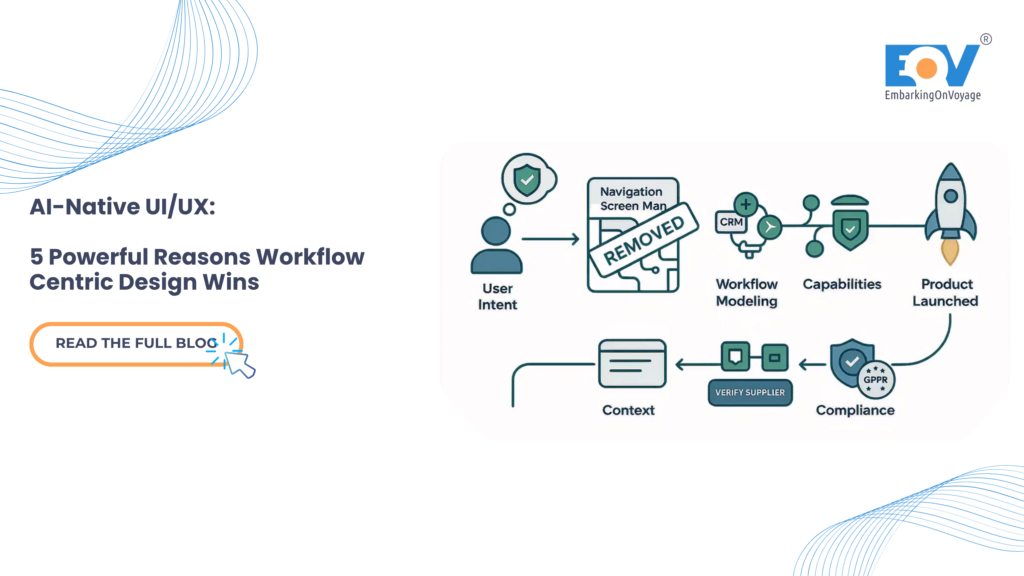
AI native platforms eliminate this need. Agentic AI can query ERP, cross-reference global CRM data, and compile final results without users opening any applications. But if the UI is still designed as a set of isolated modules, the platform is actively fighting for its own capabilities:
- Top Navigation: Users still navigate complex menus to discover what AI capabilities can emerge in context.
- Context Disadvantages: Switching between screens will discard the working conditions just created by the AI.
- Mental Model Mismatch: The user thinks of a task (for example, “launch an outbound sales sequence”); Traditional UI thinks on the screen.
Industry analysis is clear: the defining question of modern enterprise software no longer exists how humans navigate softwareBut how work runs smoothly across a global organization.
2. Model Workflows, Not Screenmaps
Effective AI-native UI/UX defines the interface based on user goals and the steps required to achieve them, rather than relying on traditional module sitemaps.
Consider the process of integrating new travel technology APIs or global supplier onboarding. The end goal is an active, verified integration that is ready to use. Workflow-centric platforms present them as one connected thread. AI fills in technical details from uploaded documentation, runs compliance checks autonomously, and suggests operational parameters based on comparable data. Users move through one coherent task instead of visiting four separate modules and manually combining the work themselves.
3. Bringing Context to the Front Automatically
The hallmark of workflow-centric design in AI-native UI/UX is that state persists across steps. The data captured in the first step is available without needing to be re-entered in the final step. AI maintains work context; the user simply maintains his intentions.
This eliminates the hidden tax of screen-centric software: the constant re-searching, re-typing, and re-orientation required every time a user crosses a module boundary. When the context aligns with the task, the tax disappears entirely.
4. Show Capabilities in Context
Instead of a large global navigation menu that lists every platform capability, the interface should only offer actions that are relevant to the current step. If an ability is not needed at the moment, it will not appear on the screen at all. This drastically reduces cognitive load, speeds up turnaround time, and makes the platform incredibly easy to learn—no complicated menus to memorize, just the next logical action.
Module Navigation vs. Module Navigation Workflow Thread This is a core UI/UX trade-off that requires deliberate decision making. Module navigation maps neatly to back-end system organization; easier to build but forces the burden of integration onto the user. A series of workflows organizes the interface around a goal and lets the AI traverse the system. They demand a more sophisticated UI/UX design effort up front, but one that fits perfectly with how everyday users think and work.
5. Global Security & Compliance Considerations
Workflow-centric design fundamentally changes the way data and permissions flow across systems. Maintaining strong global compliance requires a modern UI approach:
- Step Coverage Permissions: Provide access per workflow step, not per module. Users only have the rights necessary for the step they are executing.
- Cross-Step Data Lineage: Note exactly how context is structured and changed as it moves through the UI to ensure full auditability.
- Embedded Gateway: Place compliance checkpoints directly within the workflow interface itself. This ensures monitoring occurs right where the work is being done, without disrupting the user experience.
- Trustless Context Handling: Validate the existing context at each step, rather than blindly trusting the circumstances that occurred at the start of the process.
- Embedded Gateway: Place compliance checkpoints directly within the workflow interface itself. This ensures oversight and compliance with frameworks such as the EU AI Act occurs right where the work is done, without disrupting the user experience.
- Minimize Data: Only perform the specific context required for a step, which is fully aligned with GDPR data protection principles.
The main thing is
- Screen-centric design versus AI’s native UI/UX. This forces the user to navigate and bring in context that the AI has removed.
- Organize by goals, not modules. Model workflows, pass context automatically, and expose capabilities only when needed.
- Instill obedience natively. Step-scoped permissions keep workflow-focused platforms easy to audit and a great fit for global enterprise operations.
Build the Future of Enterprise AI EmbarkingOnVoyage (EOV) drives AI-native UI/UX, designing workflow-centric interfaces for complex global enterprise platforms. By restructuring the software around user goals, we empower B2B teams to get work done in fewer steps, less navigation, and much lower training overhead.
Explore EOV’s AI-First Digital Experience
Latest Blog Highlights:
PakarPBN
A Private Blog Network (PBN) is a collection of websites that are controlled by a single individual or organization and used primarily to build backlinks to a “money site” in order to influence its ranking in search engines such as Google. The core idea behind a PBN is based on the importance of backlinks in Google’s ranking algorithm. Since Google views backlinks as signals of authority and trust, some website owners attempt to artificially create these signals through a controlled network of sites.
In a typical PBN setup, the owner acquires expired or aged domains that already have existing authority, backlinks, and history. These domains are rebuilt with new content and hosted separately, often using different IP addresses, hosting providers, themes, and ownership details to make them appear unrelated. Within the content published on these sites, links are strategically placed that point to the main website the owner wants to rank higher. By doing this, the owner attempts to pass link equity (also known as “link juice”) from the PBN sites to the target website.
The purpose of a PBN is to give the impression that the target website is naturally earning links from multiple independent sources. If done effectively, this can temporarily improve keyword rankings, increase organic visibility, and drive more traffic from search results.